
LeadLog: a lead capture app for trade shows and events
Record a quick voice note or snap a business card, and LeadLog fills in the contact details for you. Your whole team’s leads end up in one list, ready to follow up and export to Excel.
What is LeadLog?
LeadLog is a lead capture app for exhibitors, sales teams and anyone who meets potential customers at trade shows, conferences and networking events. You capture each person with a short voice note, a photo of their business card or a quick form, and LeadLog turns it into a tidy lead record with their name, company, email and phone number.
Meeting people at an event is the easy part. The hard part is remembering who was who once you’re back in the office, with a pile of business cards on the desk and half the conversations already forgotten.
LeadLog was built to fix that moment at the stand. It takes a few seconds to capture a lead while the conversation is still fresh, and when the event is over you export everything to Excel for your CRM.
LeadLog is built and run by GBA Solutions, a bespoke software company in County Kildare, Ireland.
The problems LeadLog solves
Business cards piling up
You collect cards all day, but by the time you’re back at the office you can’t remember who needed what. With LeadLog each card is photographed and turned into a lead on the spot, and the original image stays attached to the record.
Details forgotten before follow-up
The useful part of a conversation is what the person needs and when to get back to them, and that’s the first thing to fade. A voice note captures it in your own words straight away.
Slow typing and spreadsheet backlogs
Typing into a spreadsheet on a phone is slow, so it gets left for later. LeadLog pulls the details out of your voice note or card photo, so there’s no data entry waiting after the show.
Leads scattered across the team
When several people work a stand, leads end up in different phones, notebooks and inboxes. In a LeadLog team workspace everyone captures to the same shared list and you can see who captured each lead.
Who LeadLog is for
- Trade show exhibitors
- Sales teams
- Networking event regulars
- Small business owners
- Consultants and service providers
- Anyone who collects business cards
For trade show exhibitors
Capture each visitor to your stand as soon as they walk away, by voice or by scanning their card. Tag the best ones as hot while you remember the conversation, and export the whole list to Excel when the show closes.
For teams sharing a stand
Create a workspace for the event and invite your colleagues by email. Everyone captures to the same list, and each lead shows who captured it, which makes it easier to agree who follows up.
For networking events
Record a quick voice note while you walk to the next group, so you can keep talking to people instead of typing. Share your own details with your digital business card.
For field sales and client meetings
Log a contact immediately after a meeting, with the details of what you discussed and when to follow up.
For small businesses tracking enquiries
Enquiries arrive by phone, email, events and referrals, and they’re easy to lose. Use LeadLog as one searchable list for all of them and record a voice note when someone rings.
How LeadLog works
Getting started takes a couple of minutes and needs no training.
Sign up free
Go to app.leadlog.app and create an account with Google or your email address. No credit card is needed.
Create a workspace
Name your workspace after your event, such as “Tech Expo 2026”, and invite colleagues by email if you’re working the stand together.
Capture leads at the event
Tap Voice and talk about the person you’ve just met, snap a photo of their business card, or type the details into a short form. Check the details, set the priority and add notes.
Export and follow up
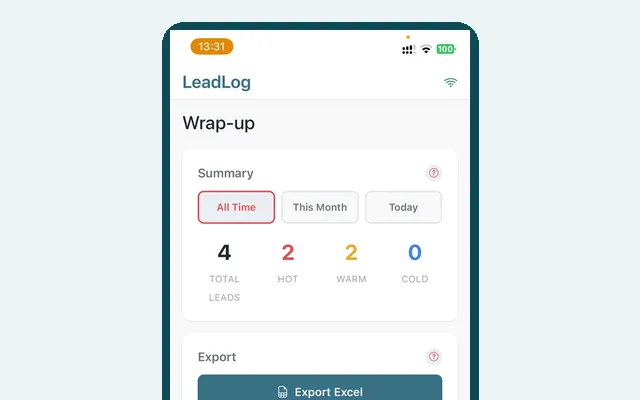
When the event ends, go to the Wrap-up tab and export your leads to Excel. Email or download the spreadsheet and import it into your CRM.
What LeadLog does
Voice capture
Speak naturally about the person you met, as if you were telling a colleague. LeadLog transcribes the recording and pulls out their name, company, email, phone, website and notes, and the original transcript is saved with the lead.
Business card scanning
Photograph a business card and AI reads the name, company, job title, email, phone and website into a new lead within seconds. The card photo is kept with the record so you can always check the source.
Photos with each lead
Add up to four images to a lead, such as brochures or handwritten notes.
Hot, warm and cold tagging
Mark each lead by priority and filter your list so you ring the best opportunities first.
Team workspaces
Invite team members to a shared workspace by email. Leads sync between everyone’s devices in real time and each one shows who captured it and when.
Excel export
Export all your leads to Excel with one tap, including name, company, email, phone, priority, notes and capture date. It can be imported into whichever CRM you use.
Digital business card
Set up your own details once and share them as a QR code. The other person scans it with their normal phone camera and saves you to their contacts, with no app needed on their side.
Works without a signal
If the venue’s connection drops, LeadLog stores the leads, photos and voice recordings you capture on your device and syncs them when you’re back online.
LeadLog compared with business cards and spreadsheets
Here’s how capturing leads with LeadLog differs from the usual mix of paper cards, notes and spreadsheets.
| The usual way | With LeadLog | |
|---|---|---|
| Capturing a contact | Collect a card or scribble a note and hope you can read it later | Scan the card or record a voice note and the details are filled in for you |
| What you discussed | Relies on memory, which fades within a day or two | Recorded in your own words straight after the conversation |
| Data entry | Cards typed into a spreadsheet days after the event, if at all | No typing backlog, because each lead is created at the stand |
| Priorities | Every card in the pile looks the same | Leads tagged hot, warm or cold so you know who to ring first |
| Working as a team | Leads spread across different people’s phones and notebooks | One shared list that shows who captured each lead |
| Getting leads into your CRM | Retyped by hand from cards and notes | Exported to Excel with one tap and imported into your CRM |
| Sharing your own details | Paper cards that run out | A QR code business card on your phone |
Your data and support
- LeadLog stores your leads in Google Firebase, with encryption at rest and in transit.
- Your data is yours, and LeadLog never sells or shares it.
- Payments are handled by Stripe, so your card details are never stored on LeadLog’s servers.
- If you pause or cancel, your leads stay in your account in read-only mode and you can still view and export them.
- LeadLog is built and supported by GBA Solutions in Ireland, and you can get in touch at hello@leadlog.app.
LeadLog pricing
Free
Free
Capture up to 5 leads with every feature, no credit card needed
Pro
€9.99 a month
Unlimited leads and all features, plus VAT if purchased in Ireland
If you only exhibit at a few shows a year, you can pause your subscription between events. While it’s paused you can view your leads but not add or edit them. In a team, each member needs their own subscription.
Common questions about LeadLog
What is LeadLog?
LeadLog is a lead capture app for trade shows, conferences and networking events. You capture each lead with a voice note, a business card photo or a quick form, and LeadLog stores them in one organised list ready to follow up and export to Excel.
How much does LeadLog cost?
LeadLog is free for up to 5 leads with every feature, and you don’t need a credit card to sign up. LeadLog Pro is €9.99 a month (plus VAT if purchased in Ireland) for unlimited leads, and you can pause your subscription between events.
How does LeadLog’s voice capture work?
You tap the Voice button and speak naturally about the person you met, including their name, company, contact details and what they need. LeadLog transcribes the recording with OpenAI’s Whisper and AI extracts the contact details into a new lead. You can review and edit every field afterwards.
Can LeadLog scan business cards?
Yes. Take a photo of a business card in LeadLog and AI reads the name, company, job title, email, phone number and website into a new lead within seconds. The original photo is saved with the lead.
Do I need to download LeadLog from an app store?
No. LeadLog is a Progressive Web App that runs in your browser at app.leadlog.app, on iPhone, iPad, Android and desktop. On iPhone you add it to your home screen from Safari, and on Android you install it from Chrome, after which it opens like any other app.
Does LeadLog work without an internet connection?
Yes. If you lose signal at a venue, LeadLog keeps the leads, photos and voice recordings you capture on your device and syncs them when you’re back online.
Can my whole team use LeadLog at the same event?
Yes. You create a workspace and invite colleagues by email, and everyone captures leads to the same shared list in real time. Each lead shows who captured it and when, and each team member needs their own subscription.
How do I get leads from LeadLog into my CRM?
Go to the Wrap-up tab in LeadLog and export your leads to Excel, then email the spreadsheet from the app or download it. The export includes name, company, email, phone, priority, notes and capture date, and it can be imported into Salesforce, HubSpot, Pipedrive or most other CRMs.
Is LeadLog a replacement for a CRM?
No, LeadLog focuses on the moment of capture rather than managing ongoing customer relationships. It gets contact details down quickly and accurately at events, then you export them to your CRM for follow-up.
Is my data safe in LeadLog?
LeadLog stores your data in Google Firebase with encryption at rest and in transit, and never sells or shares it. Payments go through Stripe, so your card details aren’t stored on LeadLog’s servers.
What happens to my leads if I pause or cancel LeadLog?
Your leads stay in your LeadLog account in read-only mode, so you can still view and export them. When you resubscribe for your next event, full editing is restored.
Want to know if LeadLog is right for you?
Have a look at leadlog.app, or get in touch and we’ll talk you through it.